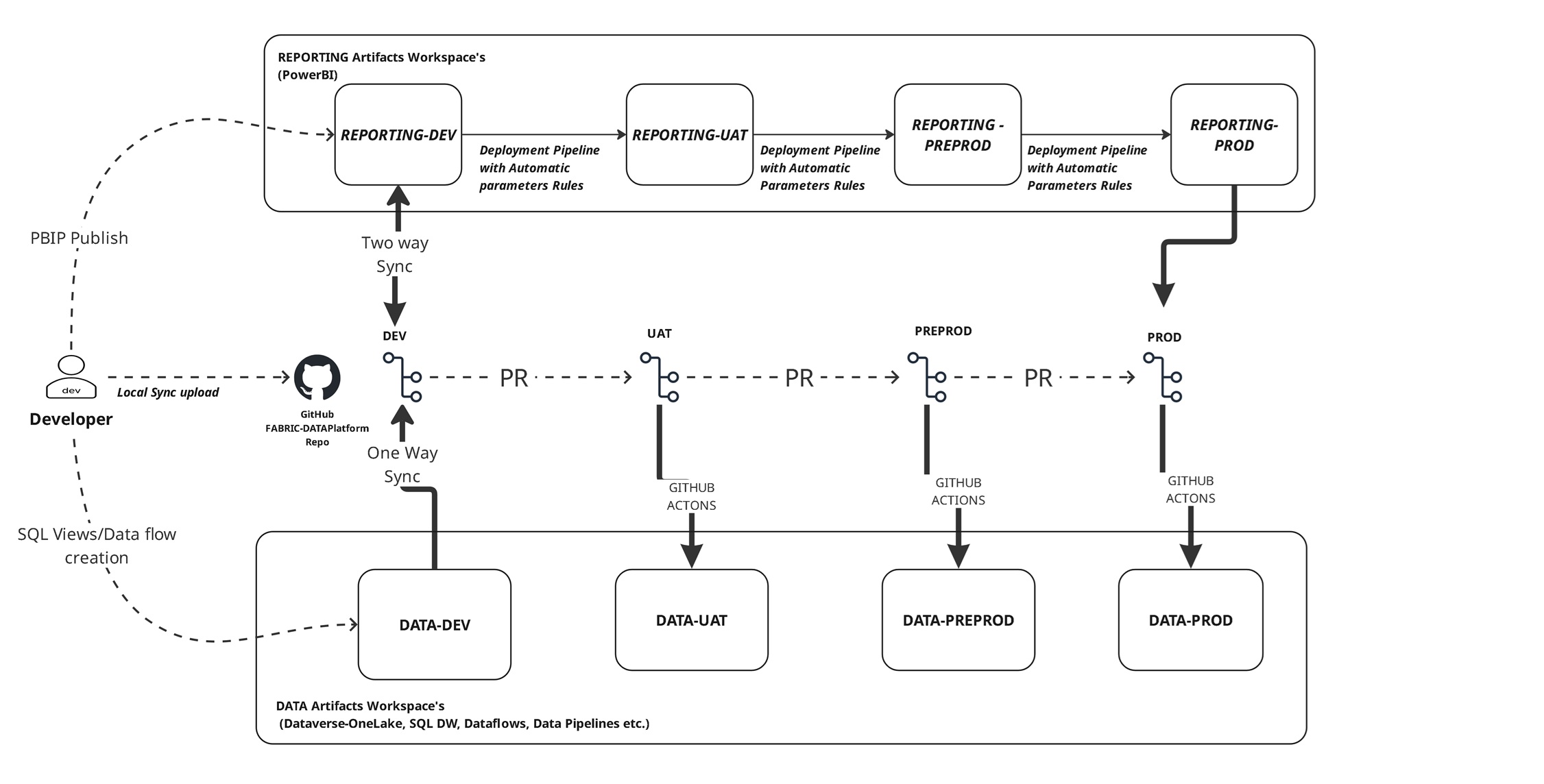
I want to share recently developed and deployed MS Fabric GITHUB Reporting Service Design Archtiecture based on a two-tier workspace architecture provides a future-ready foundation for enterprise reporting and data management. By bridging the gap between Data and Reporting artifact integrating with GITHUB.
Two-Tier Fabric Workspace Architecture
A separation of Data and Reporting responsibilities for better governance, scalability, and collaboration.
Tier 1: Data Workspaces
- Contain SQL views, dataflows, pipelines, and semantic data models.
- Serve as the source of truth for reporting workspaces.
- Ensure clean separation of raw, curated, and business-ready data assets.
Tier 2: Reporting Workspaces
- Contain Power BI reports and dashboards.
- Consume data models from the Data Workspace tier.
- Deployment pipelines enforce consistent and secure promotion across environments.
| Fabric Artifacts | Workspace Type | Deployment Type | Developer's Flow Process |
|---|---|---|---|
| SQL | DATA workspace | GitHub Actions |
DEV: Developer creates SQL Views in DATA workspace, After SQL statement is executed
through UI SQL Editor/SSMS/Azure data studio etc, in workspace source UI control commits changes to GitHub
(one-way sync).UAT: PR from DEV → UAT triggers SQL GitHub Actions deployment to DATA-UAT.PREPROD: PR from UAT → PREPROD triggers SQL GitHub Actions deployment to DATA-PREPROD.PROD: PR from PREPROD → PROD triggers SQL GitHub Actions deployment to DATA-PROD.
|
| Data flow Gen 2 | Data workspace | Deployment Pipeline |
DEV: Developer creates DataFlows in DATA-DEV workspace, After creation, in workspace source UI
control commits changes to GitHub (one-way sync).UAT: Through Deployment Pipeline promotes DATA-DEV → DATA-UAT
(automatic parameter rules applied).PREPROD: Through Deployment Pipeline promotes DATA-UAT → DATA-PREPROD.PROD: Through Deployment Pipeline promotes DATA-PREPROD → DATA-PROD.
|
| LakeHouse (Dynamics 365 Dataverse table) | DATA workspace | NA | No Action, it's not part of source control. If required just re-map the table in Microsoft fabric link. |
| Power BI Reports, Semantic Models | Reporting workspace | Deployment Pipelines |
DEV Powerbi Development: Two options available: 1️⃣ Local Sync via GitHub [Preferred] — Develop and Upload the PBIP Files via local GitHub sync and after sync you'll notice the synced reports in REPORTING-DEV workspace and crosscheck the report and commit in workspace source control Menu.2️⃣ Direct Publish [Not Preferred] — Publish PBIP from Power BI Desktop directly to REPORTING-DEV and
crosscheck the published report and commit in workspace source control Menu.
In this option it won't create a PBIP file in GitHub source control.UAT: Through Deployment Pipeline promotes REPORTING-DEV → REPORTING-UAT (automatic parameter rules applied).PREPROD: Through Deployment Pipeline promotes REPORTING-UAT → REPORTING-PREPROD.PROD: Through Deployment Pipeline promotes REPORTING-PREPROD → REPORTING-PROD.
|
📌Key Benefits
✅ Version Control & Traceability – Every change is tracked via Git commits and PR reviews.
✅ Automated Deployments – GitHub Actions and Fabric pipelines eliminate manual deployments. ✅ Environment Consistency – Parameter rules ensure seamless transitions across environments. ✅ Developer Productivity – Local sync enables faster iteration without losing governance. ✅ Enterprise-Ready Governance – Audit trails, rollback capability, and approval workflows built-in.